Evaluating Vector Christmas Bell Graphics for Digital Product Creation
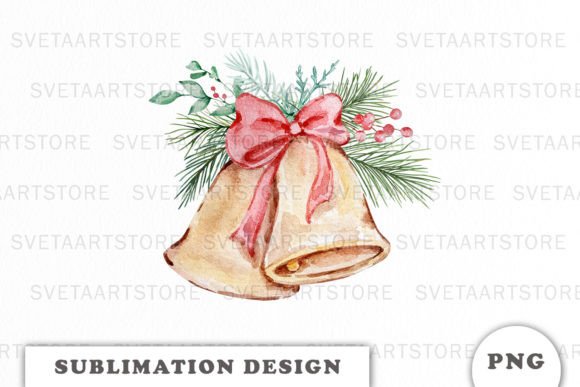
If you’re prepping for the holiday sales rush—whether on Etsy, Shopify, or a print-on-demand platform—adding new graphics to your shop is a strategic move. This week, I downloaded a set of Vector Element Christmas Bells to evaluate its potential for a seasonal product line. Let's talk about its real-world application from a seller's perspective.
First Impressions: A Festive & Commercial-Friendly Style
Opening the files, the illustrations immediately struck a balance between festive charm and clean, commercial appeal. They lean towards a classic, decorative holiday style—not overly cute or rustic, but clearly ornamental. This gives them a broad niche appeal: they feel suitable for customers looking for traditional Christmas motifs, whether for home decor, greeting cards, or apparel. The visual personality is celebratory without being childish, which can attract a wide audience from crafters to small businesses wanting polished seasonal branding.
Testing Across Product Formats Before You List
Before I even consider a new listing, I test a graphic design asset across multiple potential product types. The included file formats—AI, EPS, SVG, PNG, and JPEG—are crucial for this. Here’s a practical test-run scenario for these bells.
Immediate Use Cases: SVG, PNG, and Printable Designs
For sellers targeting Cricut projects or Silhouette users, the SVG file is the first stop. I imported it into design software to check the cut lines and layers. Clean, separate paths mean it’s viable for sticker designs, planner stickers, and scrapbooking kits. The PNG files with transparency are perfect for quick drag-and-drop into Canva templates for social media graphics, blog graphics, or digital download items like printable wall art. I mock up a simple greeting card in minutes.
For print-on-demand or sublimation designs, the vector origins (AI/EPS) allow for resizing without quality loss. This means one asset can scale from a tiny mug design to a large tote bag print or tumbler wrap. I created mockups for a t-shirt and a festive mug to see how the bell illustration holds its detail when printed.
Where This Asset Elevates Your Product Presentation
A strong digital product isn’t just about the file; it's about how you present it. Using these bells in your product mockups can significantly boost listing appeal.
Building Thumbnail Appeal & Perceived Value
In a crowded marketplace like Etsy or Creative Fabrica, your thumbnail is your first sales pitch. Placing these bells prominently in a clean mockup preview—on a card, shirt, or as part of a digital paper pack—creates immediate visual storytelling. It signals a complete, usable product. For product bundles, like a holiday clipart bundle or seasonal collection, these illustrations can serve as a unifying decorative element across your listing images, building brand consistency and customer trust.
Supporting a Professional Collection Look
When you're building a themed shop update, cohesive design assets help your entire collection look curated. These bells can act as a recurring motif in your promotional visuals, packaging design concepts, and even your own brand identity for the season. This visual hierarchy makes your shop appear more professional, increasing the perceived value of your digital downloads.
Strategic Applications & Best Fit Products
Based on my tests, the Vector Element Christmas Bells work exceptionally well in certain contexts.
- Large Product Previews: Their decorative nature shines in full-size mockups for printable products like art prints or invitation templates.
- Themed Bundles: They’re ideal as a featured graphic in a holiday design bundle on a creative marketplace.
- Merchandise Graphics: For t-shirt designs, mug designs, and other apparel, they provide a clear, scalable festive graphic.
- Digital Download Layouts: In Canva templates sold as editable files, they offer users a ready-made decorative element.
Cautions & Considerations for Commercial Use
Even with great assets, practical checks are necessary to avoid product issues.
These bells should be used carefully in a few scenarios:
- Tiny Details: For very small sticker designs, some intricate interior details might become too fine for clean cutting or printing.
- Crowded Thumbnails: If your listing image is already busy with text and other elements, adding a complex bell graphic can reduce clarity.
- Low-Resolution Products: Always use the source vector files for printed goods; relying on the JPEG for large prints risks pixelation.
- Weak Contrast Backgrounds: On dark backgrounds without adjustment, some lighter linework might fade. Always test on both white and dark mockup backgrounds.
- Text-Heavy Templates: As a decorative element, balance is key. Don’t let it overwhelm the actual text in invitation or card templates.
Essential Seller Notes Before You Go Live
Here’s my checklist before publishing any product using this asset:
- Mockup Test: Place the graphic on at least three real product mockups (e.g., card, shirt, mug) to judge its fit.
- Thumbnail Preview: See how it looks as a small marketplace thumbnail. Does the main shape attract attention?
- Color & Print Test: If selling physical goods, test a print sample (even at home) to check color reproduction from your chosen file.
- File Verification: Confirm PNG transparency is clean and SVG paths are intact for cutting machines.
- Customer File Organization: If you’re selling the illustration itself, organize the multiple file formats clearly for your buyers.
- Font Pairing Test: Experiment pairing the bells with different font styles—a serif font for traditional elegance, a sans serif for modern, or a script font for festive whimsy—to offer complete template ideas.
- License Confirmation: Always double-check the commercial license of the original asset to ensure your finished products are safe to sell.
Final Take: A Versatile Asset for Seasonal Strategy
Evaluating the Vector Element Christmas Bells as a digital product creator, I find it a solid, versatile addition to a holiday shop. Its strength lies in its commercial-ready style and multi-format support, allowing you to deploy it across SVG designs, PNG designs, and high-quality printable designs. It helps build a more professional-looking collection through strong mockups and cohesive branding.
The key is to test it rigorously in your specific product contexts—your niche, your mockup style, your target audience. By doing that, you move from simply adding a new illustration to strategically enhancing your entire seasonal digital product lineup.