From SVG to Finished Product: Crafting with the Merry Christmas Wreath
A Warm First Impression for Seasonal Products
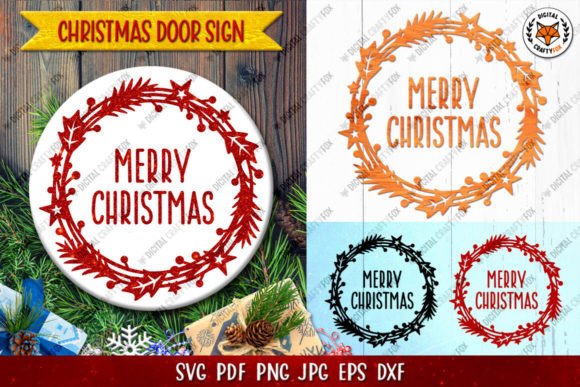
When preparing for the holiday rush in my handmade business, the first look at a new graphic design asset tells me a lot. Opening this Merry Christmas Wreath SVG immediately brings a classic, cozy, and decorative mood to mind. The round sign style with its wreath base suggests a timeless, elegant festive feel, not overly cute or minimalist. This is perfect for attracting customers who appreciate a traditional, heartwarming holiday aesthetic. It feels premium and ready for gift products.
Where This Wreath Design Thrives in Your Crafting Workflow
In my real workshop, I visualize where an illustration like this will work best before I even load the SVG into my software. For this Merry Christmas Wreath Round Sign, the clean, bold shapes of the wreath and lettering make it a versatile star for several product lines.
Top Uses for Your Seasonal Collection
- Tumbler Wraps and Mug Designs: The circular layout is ideal for wrapping around drinkware. Using the PNG files for sublimation design or the SVG for vinyl application, this can become a quick, beautiful addition to your holiday drinkware collection.
- Greeting Cards and Gift Tags: The composition naturally fits a card front or tag. The provided PNGs with transparency allow for easy placement in printable designs for a professional-looking finish.
- Decorative Wall Art and Planner Pages: As a printable design, the scale and clarity make it suitable for framing or for digital planner stickers, adding a festive touch without being too busy.
- Tote Bags and T-shirt Designs: For larger applications, like on fabric, the design offers good impact. It works well as a central motif on a tote bag or the front of a holiday shirt for craft fairs.
- Handmade Packaging and Thank-You Cards: Using the SVG to cut vinyl or paper accents for your Etsy product packaging elevates your small business branding during the holidays.
Handling the Design for Different Materials
Getting a zip folder with multiple file types—SVG, DXF, EPS, and PNG—is a crafter’s dream, but the real test is in application. Here’s how I approach this asset for real customer orders.
Large-Scale and Clean Layouts Are Its Strength
This graphic design asset excels where you need a clear, readable shape. The wreath itself isn’t overly detailed with tiny leaves, which means it cuts cleanly on vinyl for adhesive stickers or cardboard for gift tags. It’s fantastic for larger cut files on signs or as a decorative accent on a holiday apron.
Points to Test Carefully Before Production
As an experienced maker, I always run tests. For this design, pay attention to a few things:
- Very Small Cutting Details: While the overall shape is clean, if you resize the entire design down very small for, say, a tiny planner sticker, the spacing between “Merry” and “Christmas” might become too tight. Always test a cut at your intended final size.
- Layered Vinyl Projects: If you plan to layer different colored vinyl for the wreath and the text, check the SVG layers in your cutting software. Are they separated correctly for a multi-color application?
- Low-Contrast Colors: If you’re printing the PNGs for printable wall art, test how it looks on both white and dark paper backgrounds. The design’s integrity relies on good contrast.
Practical Notes from the Workshop Bench
My process for integrating a new asset like this into my handmade business is methodical. Here are my essential steps, which I recommend to any creative entrepreneur:
- Open and Check the SVG File: Immediately open the SVG in your design software (I use it for both Cricut projects and Silhouette projects). Zoom in. Are the lines closed and clean? No stray nodes? This is crucial for a smooth cut.
- Preview the PNG Transparency: Open the provided PNG files. Is the background truly clean? This is vital for placing the design on product mockups for your Etsy shop or print-on-demand listings.
- Confirm Resolution for Sublimation: If you’re using this for mug design or other sublimation, ensure the PNG files are high-resolution enough for a crisp print on your substrate.
- Test on Real Mockups: Before committing to a batch of products for a market, place the design on photos of real mugs, shirts, and totes. Does it scale well? Does the layout look balanced?
- Pair with Complementary Fonts: While the design includes text, you might want to add your business name or a personalization. This wreath pairs beautifully with a simple sans-serif font for a clean look or a delicate script font for a more feminine, decorative product.
- The Most Important Step: License Confirmation: Never assume. Before using this for any commercial design or customer order, explicitly confirm the commercial license terms for the asset. This protects your small business.
Building Your Holiday Collection Around This Asset
For a seller preparing a seasonal collection, this Merry Christmas Wreath SVG can be a core element. Imagine a coordinated line: mugs with the wreath, matching gift tags using the cut file, and printable holiday cards featuring the design. It creates a cohesive brand look for your creative marketplace stall or online shop.
It also works wonderfully in a design bundle for your customers. For example, offering a digital product pack that includes printable tags, card fronts, and planner stickers all using this consistent illustration theme.
A Final Word on Crafting Confidence
Using a new graphic design asset, especially for paid customer orders, requires confidence. This Merry Christmas Wreath design, with its solid file formats and classic style, provides a reliable foundation. By following a thorough testing workflow—checking the cut lines, verifying print quality, and ensuring proper licensing—you can transform this single illustration into a multitude of heartfelt, handmade holiday products. It supports the real work of crafting: from a digital file on your screen to a tangible, festive product ready for a gift box.